Before rockyou.txt became a familiar filename in CTF walkthroughs, it was evidence of a security failure that affected millions of people. Its journey from a breached service to a password-auditing wordlist connects three subjects that are often taught separately: how organisations lose passwords, how people choose them, and how security tools test guesses against protected data.
This guide follows that journey. We start with RockYou, move into Capture the Flag challenges, and then build a small, reproducible lab with Hashcat and John the Ripper. You will learn what the commands do, what their results actually establish, and why an unsuccessful wordlist run is not a password-strength certificate.
Lab scope: the exercises use invented passwords and locally generated hashes. Use password-recovery tools with your own files, CTF-provided material or an explicitly authorised assessment. You do not need a leaked database or the actual RockYou list to complete the lab.
Contents
- 1. The story behind RockYou
- 2. How a breach became a wordlist
- 3. A short timeline, and the names that cause confusion
- 4. What rockyou.txt is—and what it cannot tell you
- 5. Why RockYou appears so often in CTFs
- 6. Understand the operation before choosing a tool
- 7. A repeatable workflow for a password challenge
- 8. Prepare the tools and check your build
- 9. Build a lab with known answers
- 10. Hashcat: separate the hash mode from the attack mode
- 11. Hashcat dictionary mode: establish a baseline
- 12. Hashcat rules: transform a hypothesis
- 13. Hashcat masks: make the search space explicit
- 14. Hashcat hybrids and combinators
- 15. Reading Hashcat results without overclaiming
- 16. Sessions, restore points and sensitive output
- 17. John the Ripper: why Jumbo matters
- 18. John dictionary mode and result checking
- 19. John rules: inspect before expanding
- 20. John masks, incremental mode and single mode
- 21. John sessions and a protected-file example
- 22. Hashcat or John? Choose by the artifact
- 23. Using an existing RockYou installation in a CTF
- 24. Common errors and what to check first
- 25. Using cheat sheets and historical screenshots
- 26. What this teaches defenders
- 27. Mini challenges: prove what changed
- 28. Sources and further reading
1. The story behind RockYou
RockYou operated in the era of social-network widgets, photo slideshows and applications that users embedded in their profiles. Behind those lightweight features sat something much more consequential: a database of account information.
In 2009, a breach exposed approximately 32 million users’ email addresses and passwords. The subsequent FTC case against RockYou described failures in the company’s handling of personal information. Its complaint alleged clear-text password storage, insufficient server segmentation and a failure to address foreseeable web attacks, including SQL injection.
The clear-text detail changes the story. If a database already contains readable passwords, an intruder who obtains it does not first need Hashcat, a GPU or a successful guessing strategy to read them. The protective boundary has already failed.
The case also illustrates how credential collection can magnify an incident. The complaint described a registration process that initially collected an email account password, followed by a prompt to choose a RockYou password. It highlighted the resulting risk to users’ email accounts and the consequences of password reuse.

2. How a breach became a wordlist
A wordlist is a collection of candidate strings, usually one per line. A password-auditing program reads those candidates and tests them against a supported hash or encrypted-file verifier.
The RockYou passwords became a widely circulated corpus, and rockyou.txt became a familiar starting point for password-recovery exercises. Keeper’s overview describes this later use with tools such as Hashcat and John the Ripper.
Be careful with the numbers. The number of accounts in a breach is not the same measurement as the number of lines in a distributed wordlist. Kali’s wordlists package documentation shows a commonly packaged rockyou.txt containing 14,344,392 lines, while the original incident involved approximately 32 million users. Lists can be processed, deduplicated and repackaged; those figures should not be presented as competing estimates of the same thing.
The attraction is straightforward: a corpus of human-chosen passwords can put plausible guesses ahead of arbitrary character combinations. That makes it useful for teaching candidate selection. It does not make the list complete, representative of every language or effective against every modern password.
3. A short timeline, and the names that cause confusion
| Period | What it refers to | Why the distinction matters |
|---|---|---|
| 2009 | The original RockYou breach | The exposed passwords were stored in clear text. |
| 2012 | The FTC’s enforcement action | This is the date of the regulatory case, not the date of the breach. |
| Later security training | Distribution and use of rockyou.txt | A wordlist is candidate material, not a copy of an application’s password-hashing algorithm. |
| Later collections using the RockYou name | Separately assembled or marketed password compilations | A familiar name does not establish the collection’s provenance, freshness or relationship to the original incident. |
When a headline advertises a giant new “RockYou” collection, ask what was actually collected, how duplicates were handled and whether the records are new. Do not silently substitute its advertised size for the size of the original breach or the file installed on your machine.
The lasting lesson is larger than a filename: poor storage exposes secrets immediately, while password reuse can carry the consequences into other services.
4. What rockyou.txt is—and what it cannot tell you
Think of a wordlist as a set of hypotheses. A successful match says that a tested candidate satisfies the selected verifier. An unsuccessful run says only that the candidates tried, under that format and configuration, did not produce a match.
It does not prove that the password is random, that the hash was identified correctly or that a different strategy would fail. A password may be absent because of language, age, encoding, an unexpected suffix or a completely different structure.
The list is also not a rainbow table. A wordlist holds candidate plaintext strings. A rainbow table is a different precomputation technique involving hash chains. You can use a wordlist against different supported formats because the auditing tool performs the appropriate computation during the run.
Do not upload a real password to an unknown “RockYou checker” to see whether it appears. Checking a secret should not disclose it to another service. For the exercises below, we create a harmless three-line substitute instead.
5. Why RockYou appears so often in CTFs
Capture the Flag challenges give participants deliberately prepared artifacts and a defined objective: recover a training password, open an archive, inspect a protected document or progress through a challenge. In that setting, a wordlist provides a quick first hypothesis.
The useful skill is the reasoning around the attempt. A challenge may supply a format hint, a local application, a README or a password pattern. Those clues should guide the choice of verifier and candidate strategy. Starting a huge job before reading the challenge can waste time and hide a simple format error.
A good notebook records the supplied artifact, why you selected a hash type, which candidates you tried and the result. If the first attempt fails, that record tells you whether to revisit the format, fix the input or change the hypothesis.
CTF results are deliberately shaped by challenge authors. Recovering a short MD5 password in a training task does not predict how long a properly configured production password verifier would take to audit.
6. Understand the operation before choosing a tool
| Operation | What happens | Example in this guide |
|---|---|---|
| Encoding | Data is represented in another form; no secret key is required to reverse it. | Hexadecimal representation of a digest. |
| Hashing | Input is processed into a digest; password verification can compare a candidate’s result. | Our deliberately insecure raw-MD5 lab. |
| Encryption | A key protects data that must later be recovered. | A password-protected archive uses a format-specific recovery workflow. |
| Offline guessing | Candidates are tested locally against an available verifier. | Hashcat and John processing our generated files. |
| Online guessing | Attempts are submitted to a live authentication service. | Outside the exercises in this article. |
Password recovery from a hash usually means guess, compute and compare, not “decrypt the hash.” A salt is an additional input used by a password-hashing scheme. It is normally stored with the verifier and need not be secret. Its purpose is different from that of a secret key.
Real applications should use suitable password-hashing schemes rather than raw MD5. The lab uses MD5 because it is easy to generate and compare, making the candidate-selection process visible. It is an educational fixture, not a storage recommendation.
7. A repeatable workflow for a password challenge
- Establish the artifact. Read the challenge and preserve the original file.
- Establish the verifier. Use the application context, format markers and official examples.
- Prove the setup with a small case. Confirm that your tool can load the expected format.
- Try a bounded candidate set. Begin with a relevant list or an explicit pattern.
- Inspect the result. Distinguish an exhausted search from an input or device error.
- Record the hypothesis and limits. Explain what was tested before expanding the search.
For ordinary digests, string length is a clue, not an identification method. Thirty-two hexadecimal characters can represent raw MD5, an NTLM digest or other data. Selecting a format merely because the input has the right length can produce a perfectly valid run against the wrong algorithm.
For protected files, identify the container as well as the protection scheme. The tool may need a format-specific extractor to turn the file’s verifier into a supported input representation. A raw digest, an extracted archive record and a complete database row are not interchangeable inputs.
8. Prepare the tools and check your build
The commands below use a Bash-compatible shell on Kali or another Linux system. On Kali, the relevant packages can be installed with:
sudo apt update
sudo apt install hashcat john python3
Check the tools before attempting the lab:
hashcat --version
hashcat --help
hashcat -I
john
john --list=build-info
john --list=formats
Hashcat’s device listing helps establish which compute backends and devices are actually available. A VM may not expose the host GPU. Missing runtimes and unsupported drivers are setup problems; copying a faster-looking command will not repair them.
The John examples that use raw-md5, --pot, masks and capability listings assume John the Ripper Jumbo. A minimal core build can have different options and formats. Check the Openwall project page and your installed build instead of assuming every program named john has the same capabilities.
On Windows, binary names and paths differ; an extracted program may need a prefix such as .\hashcat.exe or .\john.exe. The Bash heredoc used in the next section should be run in a Linux shell, not pasted unchanged into PowerShell.
9. Build a lab with known answers
Use a new directory for this exercise. The following script creates only synthetic data. It writes a tiny candidate list, a rule file and four single-hash files. It deliberately refuses to overwrite existing lab files.
mkdir daysec-password-lab
cd daysec-password-lab
python3 - <<'PY'
from pathlib import Path
import hashlib

files = {
    'candidates.txt': 'harbor\ncedar\nquartz\n',
    'suffixes.txt': '7\n42\n',
    'append-42.rule': '$4$2\n',
}
answers = {
    'dictionary.md5': 'harbor',
    'rule.md5': 'harbor42',
    'hybrid.md5': 'cedar7',
    'pin.md5': '0427',
}
for filename, password in answers.items():
    files[filename] = hashlib.md5(password.encode('utf-8')).hexdigest() + '\n'

if any(Path(name).exists() for name in files):
    raise SystemExit('A lab file already exists; use a fresh directory.')
for filename, content in files.items():
    with Path(filename).open('x', encoding='utf-8', newline='\n') as f:
        f.write(content)
print('Created the DaySec synthetic lab files.')
PY| Hash file | Known plaintext | Intended lesson |
|---|---|---|
dictionary.md5 | harbor | Exact candidate match. |
rule.md5 | harbor42 | A rule transforms a base word. |
hybrid.md5 | cedar7 | A word combines with a digit. |
pin.md5 | 0427 | A four-position mask includes leading zeroes. |
Knowing the answers is intentional. This is a controlled experiment: if a command produces an unexpected outcome, you can investigate the setup without wondering whether the hidden password is simply outside your search.
Download the DaySec synthetic password lab — ZIP, approximately 3 KB. It includes the ready-to-use files, a Python generator, John configuration and an answer manifest. It contains no breached password corpus. The examples below describe expected outcomes rather than measured hardware benchmarks.
10. Hashcat: separate the hash mode from the attack mode
Hashcat supports password recovery across many formats and compute devices. Its two central selectors answer different questions:
-mselects the hash or verifier type. In this lab,-m 0means raw MD5.-aselects how candidates are generated. For example,-a 0reads a dictionary and-a 3uses a mask.
The official example-hashes page links to current release examples and labels its older inline table as deprecated. Compare your input with the expected complete format, including separators, salts and cost fields where applicable.
| Hashcat selector | Meaning | Common mistake |
|---|---|---|
-m 0 | Raw MD5 | Treating all 32-character hex strings as MD5. |
-m 100 | Raw SHA-1 | Confusing a raw digest with a salted application format. |
-m 1000 | NTLM | Using a Windows-related mode for every Windows artifact. |
-a 0 | Dictionary | Expecting automatic case or suffix variations. |
-a 1 | Combinator | Forgetting that two dictionaries are required. |
-a 3 | Mask | Forgetting that the chosen mask defines the searched candidates. |
-a 6 / -a 7 | Word+mask / mask+word | Reversing the intended placement. |
These are a useful working subset, not an exhaustive list of current attack modes. Consult the Hashcat manual for the installed version.
11. Hashcat dictionary mode: establish a baseline
From the lab directory, run:
hashcat -m 0 -a 0 dictionary.md5 candidates.txt --potfile-path daysec-hashcat.pot
hashcat -m 0 dictionary.md5 --show --potfile-path daysec-hashcat.pot
The first command tests the three lines in candidates.txt against the raw-MD5 digest. The second reads the recovered result associated with that hash from the named potfile. The expected plaintext is harbor; the exact status layout depends on the version.
A potfile is persistent recovery state containing hash/plaintext associations. We choose a lab-specific filename so earlier work in a default potfile does not silently change the exercise. Use the same potfile path when requesting results.
Now deliberately try the same list against the rule target:
hashcat -m 0 -a 0 rule.md5 candidates.txt --potfile-path daysec-hashcat.potOn a fresh lab, this candidate set does not contain harbor42. An exhausted run is the expected outcome. The dictionary-mode documentation explains the basic list-driven approach; our negative test demonstrates its boundary.
12. Hashcat rules: transform a hypothesis
A rule is a small instruction sequence applied to candidate strings. Our append-42.rule contains one rule, $4$2: append the character 4, then append 2.
Preview the candidates before testing them:
hashcat --stdout candidates.txt -r append-42.ruleThe intended transformed set is:
harbor42
cedar42
quartz42
Then run the rule against the matching target:
hashcat -m 0 -a 0 rule.md5 candidates.txt -r append-42.rule --potfile-path daysec-hashcat.pot
hashcat -m 0 rule.md5 --show --potfile-path daysec-hashcat.pot
The expected recovery is harbor42. This run applies only our append rule; it is not a promise to try every possible variation. An unchanged candidate requires its own pass-through rule or a separate baseline run.
Rules are useful because they express a specific idea about password construction. Larger rule sets multiply work and can generate duplicates. Inspecting a small sample makes the strategy easier to explain and debug. See the official rule syntax; do not assume Hashcat and John rule files are interchangeable.
13. Hashcat masks: make the search space explicit
A mask specifies the possibilities at each position. For a four-digit training PIN, including leading zeroes:
hashcat -m 0 -a 3 pin.md5 '?d?d?d?d' --potfile-path daysec-hashcat.pot
hashcat -m 0 pin.md5 --show --potfile-path daysec-hashcat.pot
There are exactly 10 × 10 × 10 × 10 = 10,000 candidates in that mask. 0427 is one of them. A six-digit mask would have one million candidates; adding two positions multiplies this space by 100.
| Placeholder | Candidate characters |
|---|---|
?l | Lowercase Latin letters. |
?u | Uppercase Latin letters. |
?d | Decimal digits. |
?s | The tool’s built-in special-character set. |
?a | Lowercase, uppercase, digits and special characters. |
Quotes keep the shell from interpreting the mask. They are shell syntax, not part of the password. A mask is only as useful as its assumptions: the four-digit run says nothing about a five-digit PIN or a passphrase. The mask documentation is the reference for character sets and length controls.
14. Hashcat hybrids and combinators
A hybrid combines a dictionary word with mask-generated characters. To append one digit to each of our three base words:
hashcat -m 0 -a 6 hybrid.md5 candidates.txt '?d' --potfile-path daysec-hashcat.pot
hashcat -m 0 hybrid.md5 --show --potfile-path daysec-hashcat.pot
This describes 30 candidate constructions. The expected recovery is cedar7. A prefix would require a different ordering and mode; the hybrid documentation explains both placement and newer version-specific options.
A combinator joins entries from two dictionaries. Our three base words and two suffix entries make six combinations:
hashcat -m 0 -a 1 rule.md5 candidates.txt suffixes.txt --potfile-path daysec-combinator.pot
hashcat -m 0 rule.md5 --show --potfile-path daysec-combinator.pot
The combinations include harbor7, harbor42 and cedar42; harbor42 should match. A separate potfile makes this a fresh demonstration rather than a repeat of a result already recovered with a rule. See the combinator reference.
15. Reading Hashcat results without overclaiming
Suppose the four-digit mask finishes. What should your notes say? A useful entry would be: “Raw-MD5 training target, four decimal positions, recovered 0427.” That identifies the format, hypothesis and observed answer. “Hashcat can crack passwords instantly” discards the information that made the exercise easy.
Read status fields together. Check the selected format and candidate source before interpreting speed or recovery counts. A result imported from an existing potfile is different evidence from a newly computed recovery. Rejected candidates can also mean the tool did not test every string you thought it would.
| Observation | Interpretation to investigate |
|---|---|
| Recovery reported | Verify the target, plaintext and whether the result was already in the potfile. |
| Search exhausted | The selected candidate set finished; this is not proof of password strength. |
| No matching result | Revisit the format and assumptions before increasing the workload. |
| Device or runtime error | Repair the compute setup before evaluating the candidate strategy. |
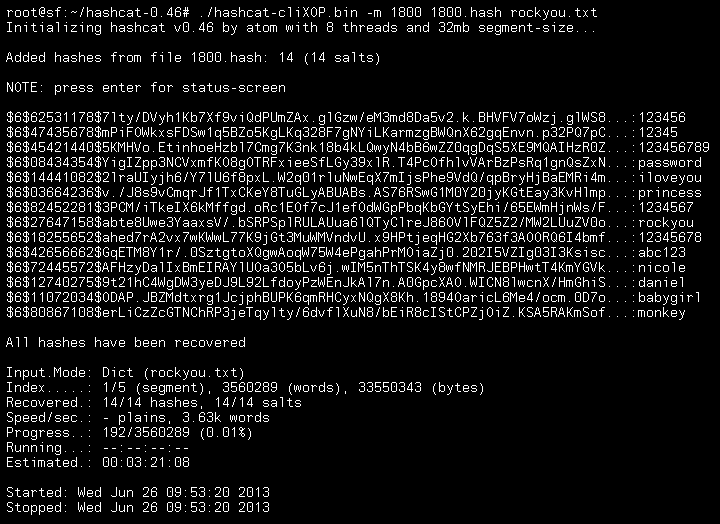
16. Sessions, restore points and sensitive output
For work that may need interruption, name the session when starting it:
hashcat -m 0 -a 3 pin.md5 '?d?d?d?d' --session daysec-pin --potfile-path daysec-hashcat.potThis tiny example will often finish before a pause is useful. Session recovery is relevant to longer authorised jobs. Preserve the input files, rules, masks and working environment needed to resume them.
Check restore syntax against your version. Older tutorials commonly resume with hashcat --session NAME --restore. The current restore documentation describes a newer split: --restore displays the saved command, while resuming uses that original command with --restore-position. Do not treat commands copied from different releases as interchangeable. Completed jobs may remove their restore files.
Potfiles, result files and terminal logs can contain recovered secrets. Keep assessment outputs access-controlled and follow the engagement’s retention requirements. A named session is a progress mechanism; it is not a separate security boundary for the data being processed.
17. John the Ripper: why Jumbo matters
John the Ripper is a password-auditing and recovery tool with a long-standing ecosystem of formats and related utilities. Jumbo expands its capabilities, including support for many protected files and OpenCL-enabled formats where the build and hardware support them.
That makes the usual “Hashcat uses the GPU; John uses the CPU” comparison misleading. The useful question is which installed tool supports this artifact and how its implementation performs on the hardware available to you.
John’s workflow uses names such as raw-md5 rather than Hashcat’s numeric -m 0. Verify the exact format label in your build. Selecting a label explicitly helps keep a known lab case reproducible and avoids accepting an ambiguous automatic guess.

For format capabilities, consult Openwall and the Jumbo option reference.
18. John dictionary mode and result checking
Use the same synthetic digest and candidate file:
john --format=raw-md5 --wordlist=candidates.txt --pot=daysec-john.pot dictionary.md5
john --format=raw-md5 --show --pot=daysec-john.pot dictionary.md5
The expected plaintext is again harbor. --show requests recovered results for the supplied target file; it does not start another candidate search. The separate John potfile keeps this exercise independent of Hashcat’s results.
For the deliberate failure case:
john --format=raw-md5 --wordlist=candidates.txt --pot=daysec-john.pot rule.md5Our literal list does not contain harbor42. This is a useful control experiment, even if it looks less exciting than a successful recovery. It proves why adding a transformation changes the candidate set.
Do not rely on a bare john hashes.txt command when teaching a specific search. John can choose a sequence of default modes when you supply no explicit strategy. Explicit options make the result easier to explain. The usage examples cover the core workflow.
19. John rules: inspect before expanding
John can apply word-mangling rules to a wordlist. First inspect the candidates produced by the installed default wordlist rules:
john --wordlist=candidates.txt --rules --stdoutThis produces candidates rather than testing a hash. The output depends on the configuration, so do not assume that a particular default rule set appends 42 or reproduces Hashcat’s output.
For an exact parallel to our custom Hashcat rule, create daysec-john.conf in the lab directory:
[List.Rules:DaySecAppend42]
$4$2
Then preview and run this named rule:
john --config=daysec-john.conf --wordlist=candidates.txt --rules=DaySecAppend42 --stdout
john --config=daysec-john.conf --format=raw-md5 --wordlist=candidates.txt --rules=DaySecAppend42 --pot=daysec-john.pot rule.md5
john --format=raw-md5 --show --pot=daysec-john.pot rule.md5
Here we intentionally chose a simple append operation supported by both tools, rather than copying an arbitrary rule collection between them. The expected recovery is harbor42. See John’s rule syntax for configuration sections and operations.
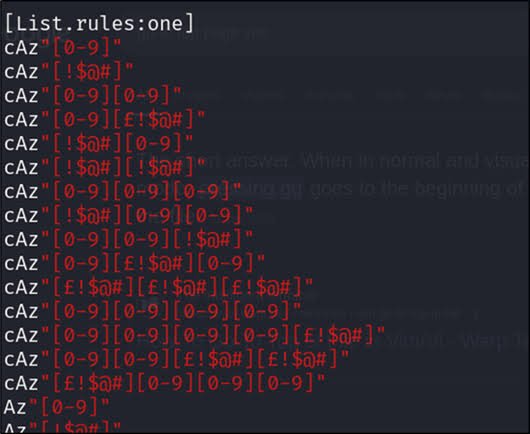
DaySecAppend42 rule above; the screenshot is not a required configuration file.20. John masks, incremental mode and single mode
Jumbo’s mask mode can describe the same four-digit experiment:
john --format=raw-md5 --mask='?d?d?d?d' --pot=daysec-john.pot pin.md5
john --format=raw-md5 --show --pot=daysec-john.pot pin.md5
The search space is 10,000 candidate strings, and the expected result is 0427. The shared notation makes this particular exercise easy to compare, but it does not mean every mask feature or escaping rule is identical across tools. Use the Jumbo mask documentation for the installed version.
John also provides incremental mode, which generates candidates according to its configured character statistics and length settings. It is a separate strategy, not another name for a dictionary run. Check the selected configuration and bounds before using it; an open-ended search can be much larger than intended.
Single mode uses account-related information and rules where the input format provides that context. Our bare MD5 files contain no usernames or GECOS information, so they are a poor demonstration of its purpose. Read the mode descriptions before deciding which mode fits an artifact.
21. John sessions and a protected-file example
Name a John session when starting a job you may need to resume:
john --session=daysec-john-pin --format=raw-md5 --mask='?d?d?d?d' --pot=daysec-john.pot pin.md5For an interrupted session that actually has saved state:
john --status=daysec-john-pin
john --restore=daysec-john-pin
The four-digit exercise may finish too quickly to demonstrate interruption. Do not expect a completed run to leave a usable recovery session. Keep the session files and original inputs available; consult the command options for interruption and recovery behaviour.
For a CTF-provided or self-created password-protected ZIP, the workflow may start with a bundled extractor:
zip2john training.zip > training-zip.john
john --wordlist=candidates.txt --pot=daysec-zip.pot training-zip.john
john --show --pot=daysec-zip.pot training-zip.john
This is an optional workflow example, not a fifth file supplied by our generator. training.zip must already exist, and recovery is only expected if its password is in the selected candidates. zip2john may require its installed path. Other formats use different helpers; do not rename an extractor’s output and assume Hashcat accepts it unchanged.
22. Hashcat or John? Choose by the artifact
| Question | Hashcat | John the Ripper Jumbo |
|---|---|---|
| How is the verifier selected? | Numeric hash modes. | Named formats, with detection support. |
| Can I use a wordlist and rules? | Yes. | Yes. |
| Can I describe a short pattern? | Masks and hybrid modes. | Masks and other generation modes. |
| Is GPU use automatic everywhere? | Depends on backends, devices and format support. | Depends on build, selected format and devices. |
| How do I approach a protected file? | Use a supported representation and matching mode. | Bundled extractors often help prepare supported artifacts. |
| Which should I learn first? | Useful for learning explicit modes and candidate construction. | Useful for learning formats, extraction workflows and auditing modes. |
For a new challenge, first ask whether the installed version can parse the artifact. Then consider your candidate strategy and available hardware. Only after those checks does a speed comparison become useful.
The tiny lab is designed for understanding, so startup time and device compilation may dominate. It is not a performance contest. A meaningful benchmark specifies the algorithm, cost parameters, number of hashes and salts, hardware, driver, tool version and candidate strategy.
23. Using an existing RockYou installation in a CTF
If a challenge explicitly calls for the packaged list, Kali documents it under /usr/share/wordlists/. Check whether your installation has the compressed or expanded form:
ls -lh /usr/share/wordlists/rockyou.txt*If only the compressed file exists, you can create a working copy in your current lab directory while preserving the packaged file:
gzip -dc /usr/share/wordlists/rockyou.txt.gz > rockyou-lab.txt
wc -l rockyou-lab.txt
Choose an unused output filename because shell redirection can overwrite an existing file. If you already have the expanded list, you can reference its path directly. Installation details come from Kali’s wordlists documentation.
For a raw-MD5 artifact supplied by an authorised challenge, the corresponding dictionary forms are:
hashcat -m 0 -a 0 challenge.md5 rockyou-lab.txt --potfile-path ctf-hashcat.pot
john --format=raw-md5 --wordlist=rockyou-lab.txt --pot=ctf-john.pot challenge.md5
These are alternatives; do not run both just to duplicate the same hypothesis. Confirm that the challenge actually uses raw MD5 first. A larger list increases coverage, but it does not fix the wrong format, make a weak clue correct or guarantee a solution.
24. Common errors and what to check first
| Symptom | First checks |
|---|---|
| “No hashes loaded” or a token/separator error | Confirm the complete input representation, expected format and whether an extractor is required. |
| A raw digest loads under several formats | Use application context; digest length alone is ambiguous. |
| The same job immediately reports a known result | Check the potfile before interpreting it as a new recovery. |
John does not recognise raw-md5 or a Jumbo option | Inspect the installed build and available formats. |
| Hashcat cannot initialise a compute device | Inspect backend information, drivers and VM hardware exposure. |
| Expected ASCII lab candidates fail | Check case, leading/trailing spaces, file encoding, BOMs and unintended newline bytes in generated hashes. |
| Search finishes without a recovery | Verify the format and candidate set; then revise one assumption at a time. |
| Work grows unexpectedly | Count combinations, rules and mask positions before extending the run. |
In particular, do not hash password plus an accidental newline when the intended input is only password. Our Python generator makes the distinction explicit: it hashes the encoded string and appends a newline only when writing the digest file.
Keep original artifacts unchanged while investigating formatting. A database record may include a username, salt, cost or metadata that the selected format expects. Blindly removing everything except the digest can destroy the information needed for verification. The Hashcat FAQ is a useful starting point for environment and parsing failures.
25. Using cheat sheets and historical screenshots
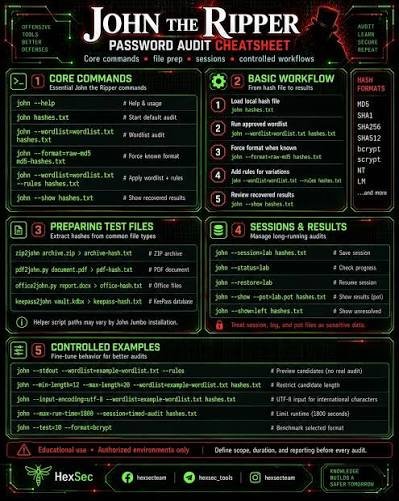
Screenshots and cheat sheets are convenient reminders, but their context matters. A command printed in an image may belong to an obsolete release, omit a required filename or describe a feature too broadly. Use the selectable commands in this article for the lab, and confirm unfamiliar switches with your installed help output.
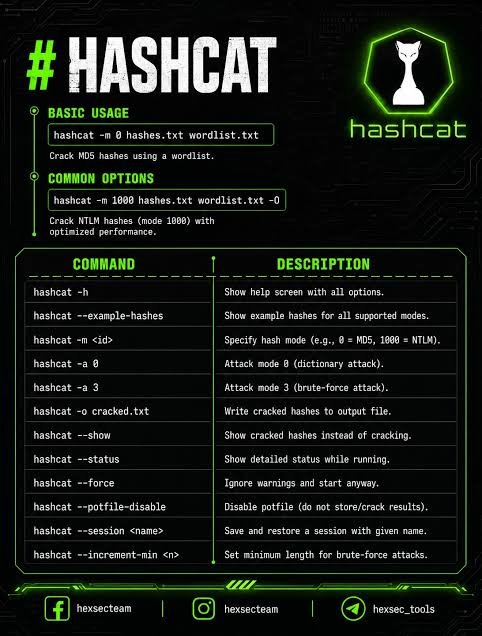
--force. It is not a general repair switch and is not used in this guide. It can bypass warnings without solving the underlying problem. Optimised kernels also have format-dependent limits; -O is not an unconditional improvement.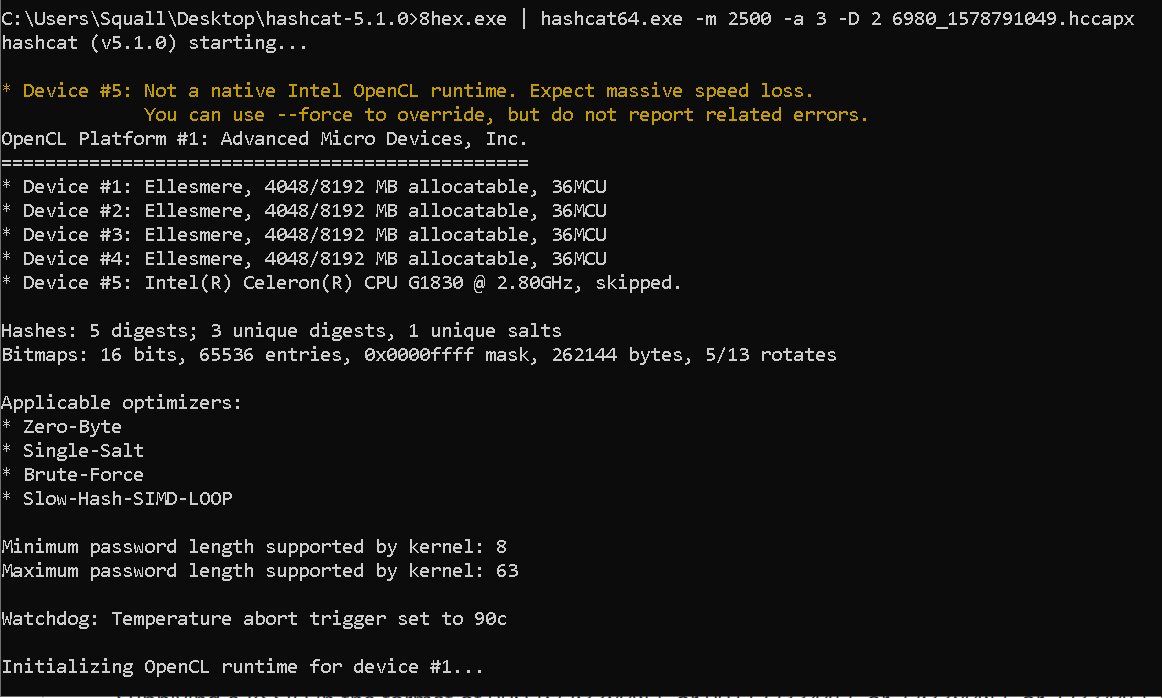
26. What this teaches defenders
The RockYou story combines an application-security problem with a credential-design problem. Preventing database injection, limiting access to stored data and protecting password verifiers address different parts of that risk. A stronger password cannot compensate for a service storing it in readable form.
For application developers, use a mature password-hashing library and an appropriate, deliberately costly scheme. OWASP’s Password Storage Cheat Sheet recommends Argon2id for new applications, with alternatives for particular constraints. Use unique salts and tune cost parameters against the application’s operating requirements. Raw MD5 and raw SHA-256 are unsuitable substitutes for a password-storage scheme.
For users, favour unique, manager-generated passwords or long, unique passphrases, and enable strong MFA where available. MFA helps protect authentication; it does not stop an offline program from testing a password hash that has already been obtained.
For services, NIST’s password guidance includes checking proposed passwords against a blocklist of common, expected or compromised values. That is one defensive control, not a reason to assume an old public list defines the full set of weak passwords.
27. Mini challenges: prove what changed
Before looking up more commands, use the small lab to answer these questions:
- Why does the baseline recover
harborbut missharbor42? - Which three strings does
$4$2produce from our candidate file? - Why does one digit appended to three words make 30 candidate constructions?
- Why must
0427remain a four-character string rather than the integer427? - If a run returns a result immediately, how would you check whether it came from the potfile?
- What would you change in your notes if the hash format were uncertain?
The answers are already present in the setup: exact matches need exact candidates, the rule appends two literal characters, the hybrid multiplies three bases by ten digits, and a leading zero is part of the password. Potfiles preserve previous results, while uncertainty about the verifier must be resolved before an unsuccessful search has much meaning.
For a follow-up exercise, add a new invented word to the list and generate its hash locally. Predict which strategy can recover it before running anything. That turns command practice into a testable explanation.
28. Sources and further reading
Historical details were checked against the FTC record, and command behaviour against official tool documentation. Documentation was reviewed on 11 November 2026; installed packages and older screenshots can differ from current upstream releases.
History and the original reading list
- FTC: security failures exposed 32 million users’ information
- FTC: RockYou complaint, including clear-text storage and web-security allegations
- The story behind rockyou.txt — AvyuktSec
- Keeper: understanding rockyou.txt
- JumpCloud: what is Hashcat?
- Mastering John the Ripper — Andrey Pautov
Primary technical references
- Kali wordlists package
- Hashcat manual and supported modes
- Hashcat example hashes
- Hashcat dictionary mode
- Hashcat rules
- Hashcat masks
- Hashcat hybrids
- Hashcat combinator mode
- Hashcat restore behaviour
- Hashcat FAQ
- Openwall John the Ripper
- John usage examples
- John core options
- John cracking modes
- John rule syntax
- Jumbo options
- Jumbo mask mode
- OWASP Password Storage Cheat Sheet
- NIST SP 800-63B password guidance
Continue learning on DaySec

